Integrate with third-party docs frameworks and systems
Choose the Stainless Docs Platform for seamless SDK documentation, or integrate with third-party providers like ReadMe, bump.sh, and Mintlify using SDK code snippets.
Stainless Docs Platform (recommended)
Section titled “Stainless Docs Platform (recommended)”We recommend using the Stainless Docs Platform for your API and SDK documentation. Since you are already using Stainless to generate your SDKs, our Docs Platform provides the most seamless, type-aware documentation experience.
The Stainless Docs Platform provides:
- Automatic API/SDK reference generation powered by the same engine that generates your SDKs.
- Language-specific reference documentation for every SDK you maintain, with accurate types and method signatures.
- Full ownership and control of your documentation site, built with the open-source Astro framework.
- Flexible hosting options: use our Stainless-managed, Cloudflare-powered infrastructure or deploy your docs to your own static site host.
- Developer-friendly workflow with Git-based publishing and local preview environments.
- Smart search and AI assistance that understand the shape of your API surface and SDKs.
Get started in minutes with our Docs Platform quickstart, or review the full Docs Platform documentation for details on customization, navigation, styling, and more.
Third-party documentation platforms
Section titled “Third-party documentation platforms”If you prefer to keep your existing documentation platform, Stainless can still generate SDK-based code snippets that integrate directly into your provider’s API reference.
Stainless can generate code snippets like client.items.list() in your users’ preferred language, so you’re not stuck with only curl examples. Stainless code snippets are:
- Generated from the same configuration that powers your SDKs.
- Kept in sync with your SDK releases.
- Embedded into your OpenAPI spec using standard vendor extensions (such as
x-codeSamples).
Stainless supports integrations with providers that support relevant OpenAPI extensions (such as x-codeSamples) including these providers:
How Stainless generates SDK code snippets
Section titled “How Stainless generates SDK code snippets”When you enable code-sample generation, Stainless produces a decorated OpenAPI document (also referred to as the “documented spec”). This file is identical to your original OpenAPI spec except that it contains extra fields with SDK code samples. Your decorated spec is available for use via a GitHub action or we can host it for you.
These samples are injected using provider-compatible vendor extensions (commonly x-codeSamples or a provider-specific field such as x-readme.samples-languages).
About the decorated OpenAPI spec
Section titled “About the decorated OpenAPI spec”Before enabling decoration, an operation might look like:
paths: /pets: post: operationId: pets_create # ... other operation fields ...After Stainless generates code samples for your SDKs, the same operation becomes:
paths: /pets: post: operationId: pets_create # ... other operation fields ... x-codeSamples: - lang: JavaScript source: |- import TestApp from 'test-app'; const client = new TestApp(); await client.pets.create({ name: 'Stanley' }); - lang: Python source: |- from test_app import TestApp client = TestApp() client.pets.create(name="Stanley")Your docs provider then renders these samples directly in the API reference UI.
1 Enable provider-compatible code samples in Stainless
Section titled “ Enable provider-compatible code samples in Stainless”To have Stainless generate decorated specs for your docs provider, configure the openapi.code_samples setting in your stainless.yml.
This tells the Stainless generator which vendor extension format your docs provider expects.
# stainless.ymlopenapi: # Set this to the docs provider format you want. # Supported examples: 'readme' | 'redocly' | 'mintlify' | 'bump.sh' | 'gitbook' | 'x-codeSamples' | 'stainless' code_samples: 'mintlify'Set openapi.code_samples to one of the supported values below. Stainless will generate the decorated spec using the extension format your provider expects.
Provider-to-extension mapping
Section titled “Provider-to-extension mapping”| Config value | Provider | Extension produced / common field | Notes |
|---|---|---|---|
bump.sh | bump.sh | x-codeSamples | Alias for x-codeSamples. |
gitbook | GitBook | x-codeSamples | Alias for x-codeSamples. |
mintlify | Mintlify | x-codeSamples | Alias for x-codeSamples. |
readme | ReadMe | x-readme.samples-languages | Adds a ReadMe-specific code samples field. |
redocly | Redocly | x-codeSamples | Alias for x-codeSamples. |
stainless | Stainless | x-stainless-snippets | Adds a Stainless-specific code snippets extension. |
x-codeSamples | Any provider supporting OpenAPI vendor extensions | x-codeSamples | Use if your provider supports this standard OpenAPI extension but is not listed above. |
For custom providers that accept OpenAPI vendor extensions, we recommend using x-codeSamples.
2 Provide the decorated spec to your docs provider
Section titled “ Provide the decorated spec to your docs provider”Once you have openapi.code_samples configured, Stainless will produce a decorated OpenAPI spec for your project. You now need to forward that spec to your documentation provider so it can render the SDK snippets.
You have two main options:
Option A: Retrieve the decorated spec via GitHub Action
Section titled “Option A: Retrieve the decorated spec via GitHub Action”If you use the Stainless GitHub Action to push an updated OpenAPI spec to Stainless, the decorated spec is available as an output in the same workflow run.
You can extend that workflow to:
- Upload the decorated spec file to your docs provider (for example, ReadMe or Redocly), or
- Commit the decorated spec into a repo that your docs platform reads from.
This ensures your API docs stay in sync with your Stainless-generated SDKs on every release.
Option B: Use the Hosted Documented Spec URL (auto-updating)
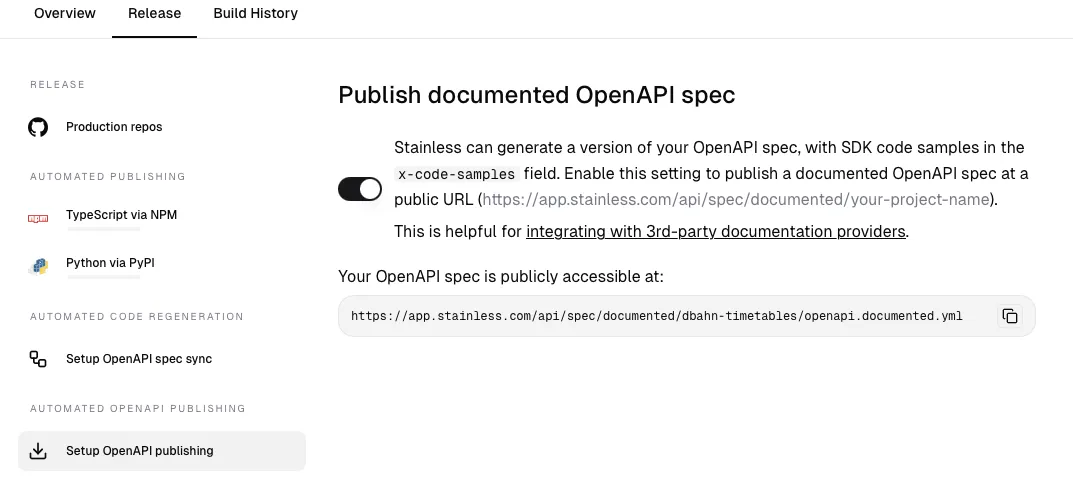
Section titled “Option B: Use the Hosted Documented Spec URL (auto-updating)”Stainless can host the decorated OpenAPI spec for your project and serve it from a stable URL that always returns the latest documented spec.
To enable this:
- Open SDK Studio → Release → Setup OpenAPI publishing.
- Enable the Published documented spec URL.
- Copy the generated URL.
- Paste that URL into your docs provider wherever a remote OpenAPI URL is accepted (for example, in Redocly, Mintlify, or bump.sh).
Your provider will periodically fetch this URL and render the x-codeSamples, x-readme.samples-languages, or equivalent extensions from the decorated spec.