

Preview and test codegen results before API changes go live
View and validate your SDKs and other codegen targets before you ship changes to your OpenAPI spec.
Preview builds are builds of your SDKs and other codegen targets based on OpenAPI spec changes in pull/merge requests you haven’t merged yet. Once set up, preview builds provide several advantages over other development workflows:
- New preview builds are generated automatically when you open or update a pull/merge request that will change your OpenAPI spec; there’s no extra steps or friction
- Preview build status, links, and other useful information is added to your pull/merge requests as a comment so you can see and test codegen results immediately, without changing contexts
- When it’s time to ship, your release builds will be based on your most recent preview builds, so you can be confident they’ll look and work the way you expect with no surprises
Requirements
Section titled “Requirements”Preview builds require the following:
- Your OpenAPI spec must be in either a GitHub or GitLab repository
- Changes to your OpenAPI spec must be made with pull/merge requests
If you don’t meet these requirements you can still automate codegen using a push-based or URL polling workflow.
Set up preview builds
Section titled “Set up preview builds”1 Set up authentication for the workflow
Section titled “ Set up authentication for the workflow”The GitHub action that powers preview builds requires authentication. We recommend you install the Stainless GitHub app to provide authentication via OIDC.
If you’re not using GitHub or can’t install the Stainless GitHub app, use an API key to authenticate instead.
To install the Stainless GitHub app:
- Open your Stainless dashboard
- If needed, navigate to the organization/project where you want to enable preview builds
- Go to the Release tab at the top and make sure Production repos is selected on the left
- Press the Install Stainless App button
- Follow the steps to complete the installation flow and give the Stainless app access to the repositories where you want to enable preview builds
Alternative: authenticate with an API key
If you don’t have admin permissions on GitHub, you’re using GitLab, or you’d prefer not to install the Stainless GitHub app, you can authenticate manually with an API key instead:
- Navigate to your organization’s settings page
- If you have more than one organization, make sure the correct one is selected
- Click Create new API key
- Add the API key to your workflow file during the next step and reference our example workflow that uses API key authentication as needed.
2 Add the workflow to your repository
Section titled “ Add the workflow to your repository”In the GitHub repository where you make changes to your OpenAPI spec, add the following .github/workflows/stainless.yml workflow file:
name: Build SDKs for pull request
on:  pull_request:    types:      - opened      - synchronize      - reopened      - closed
concurrency:  group: ${{ github.workflow }}-${{ github.event.pull_request.number }}  cancel-in-progress: true
env:  # TODO: Stainless organization name.  STAINLESS_ORG: YOUR_ORG
  # TODO: Stainless project name.  STAINLESS_PROJECT: YOUR_PROJECT
  # TODO: Path to your OpenAPI spec.  OAS_PATH: YOUR_OAS_PATH
  # Path to your Stainless config. Optional; only provide this if you prefer  # to maintain the ground truth Stainless config in your own repo.  CONFIG_PATH: YOUR_CONFIG_PATH
  # When to fail the job based on build conclusion.  # Options: "never" | "note" | "warning" | "error" | "fatal".  FAIL_ON: error
jobs:  preview:    if: github.event.action != 'closed'    runs-on: ubuntu-latest    permissions:      contents: read      pull-requests: write      id-token: write    steps:      - name: Checkout repository        uses: actions/checkout@v4        with:          fetch-depth: 2
      - name: Run preview builds        uses: stainless-api/upload-openapi-spec-action/preview@v1        with:          org: ${{ env.STAINLESS_ORG }}          project: ${{ env.STAINLESS_PROJECT }}          oas_path: ${{ env.OAS_PATH }}          config_path: ${{ env.CONFIG_PATH }}          fail_on: ${{ env.FAIL_ON }}
  merge:    if: github.event.action == 'closed' && github.event.pull_request.merged == true    runs-on: ubuntu-latest    permissions:      contents: read      pull-requests: write      id-token: write    steps:      - name: Checkout repository        uses: actions/checkout@v4        with:          fetch-depth: 2
      - name: Run merge build        uses: stainless-api/upload-openapi-spec-action/merge@v1        with:          org: ${{ env.STAINLESS_ORG }}          project: ${{ env.STAINLESS_PROJECT }}          oas_path: ${{ env.OAS_PATH }}          config_path: ${{ env.CONFIG_PATH }}          fail_on: ${{ env.FAIL_ON }}
This workflow contains two jobs:
preview- Runs when a pull request is opened or updated to create a preview build with the changes from your pull requestmerge- Runs when a pull request is merged to create a release build
3 Configure the workflow
Section titled “ Configure the workflow”Update the STAINLESS_ORG, STAINLESS_PROJECT, and OAS_PATH environment variables in this workflow (each one has a TODO comment) to match your organization, project, and OpenAPI spec file path, respectively.
This workflow requires the following GitHub permissions:
id-token: writefor GitHub OIDC authenticationpull-requests: writefor adding preview build comments to pull requestscontents: readto check out your repository’s code to read your OpenAPI spec and config files
For more configuration details, see the workflow’s README file and our example workflow files.
4 Secure public repositories
Section titled “ Secure public repositories”If your GitHub repository is public, make sure you require approval for workflows from forked pull requests to prevent unauthorized access to your OIDC tokens or secrets:
- Go to your repository on GitHub
- Navigate to Settings > Actions > General
- Under Fork pull request workflows from outside collaborators select the Require approval for all outside collaborators option
See GitHub’s documentation for more details.
Use preview builds
Section titled “Use preview builds”Once preview builds are set up, they’ll be triggered automatically as you work on your API so you can see and test codegen results before you ship changes.
Trigger a preview build
Section titled “Trigger a preview build”Open or update a pull/merge request which changes your OpenAPI spec to trigger a preview build.
Preview build comments
Section titled “Preview build comments”Stainless will add a comment to your pull/merge request when a preview build is triggered:
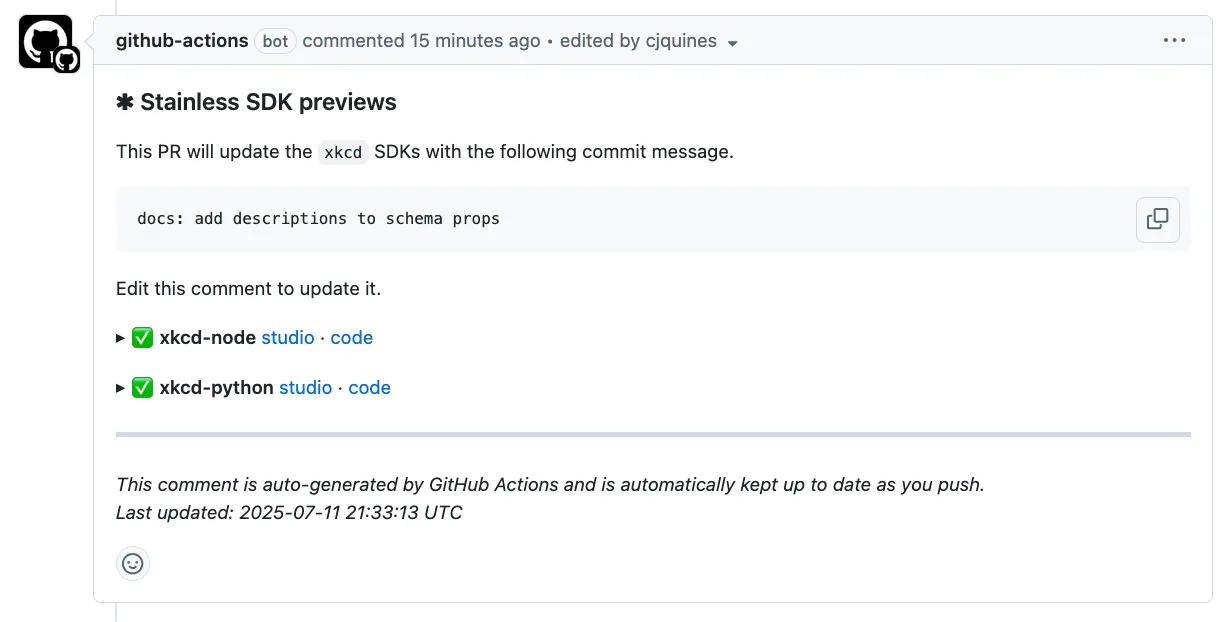
The comment contains the following:
- The commit message Stainless will use when you merge your changes (which you can edit by editing the comment)
- Build results for each build target
- Links to the Stainless studio and the code for each target
For some build targets, the comment will also include instructions for downloading and installing the preview build of the SDK or tool so you can test it locally.
Iterate
Section titled “Iterate”If you need to make changes you can do any of the following:
- Update your pull/merge request with adjustments to your OpenAPI spec
- Modify your Stainless config in the Studio using the links in the Stainless comment
- Add or modify custom code in your preview builds
Release
Section titled “Release”When everything looks and works as it should, merge the changes to your OpenAPI spec to produce final builds based on your most recent preview builds.