Most OpenAPI specs aren't wrong, but they're not entirely right, either. When you're generating SDKs from your spec, "mostly right" can break things. Different frameworks, generators, human edits, and internal pipelines produce subtly incompatible outputs.
We've seen it across thousands of specs at Stainless:
Type mismatches: IDs declared as integer that are actually strings
Inline duplication: The same object shape copy-pasted across dozens of endpoints
Naming collisions: Properties like public, class, or default that conflict with language keywords
Structural issues: Missing required fields, mismatched casing, recursive schemas with no base case
These aren't spec bugs you can file and forget. They block SDK releases, and upstream teams often can’t fix them on your timeline. OpenAPI Overlays help for simple patches, but deduping schemas or renaming structures quickly outgrows what Overlays can express cleanly.
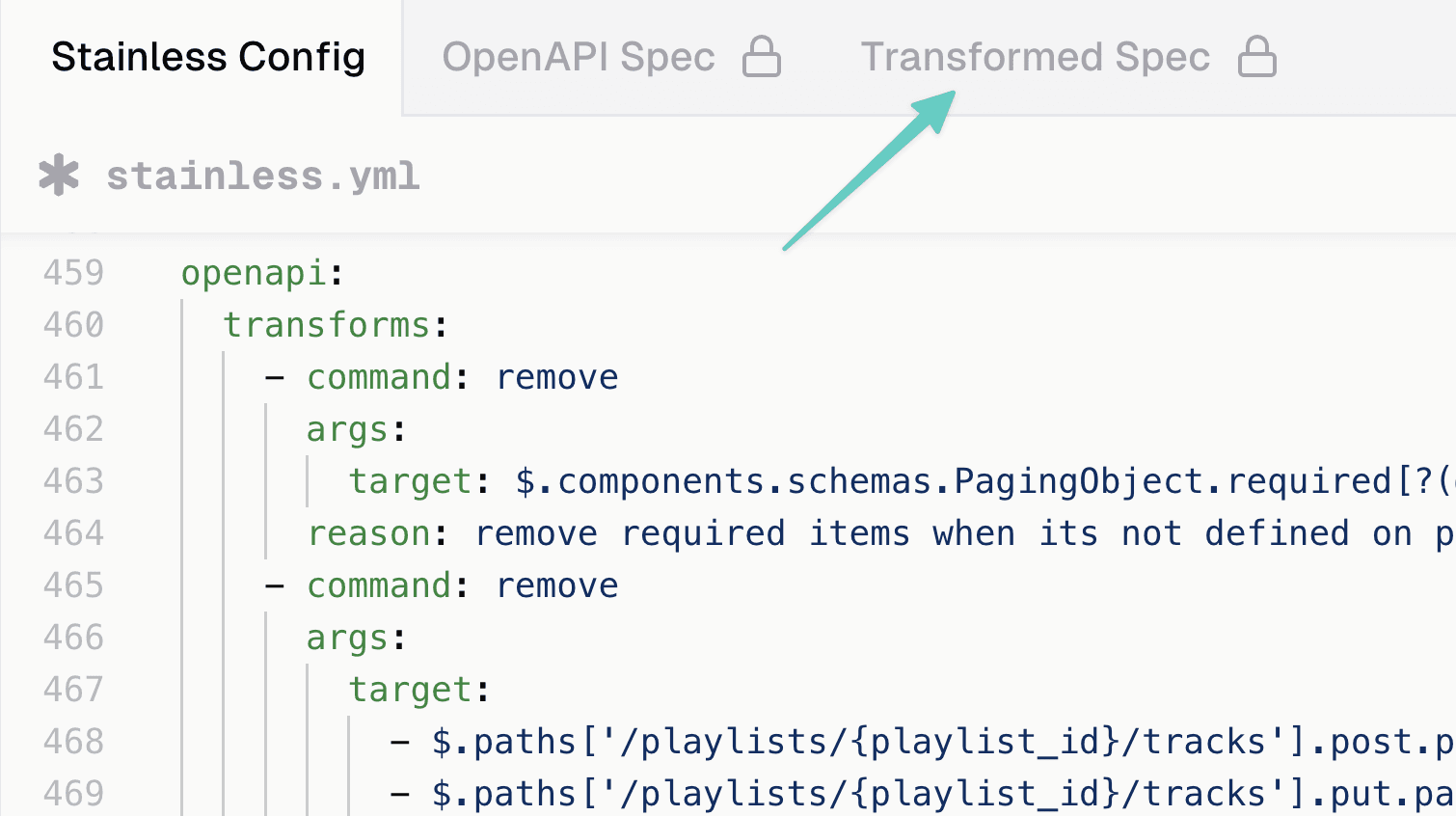
Stainless Transforms provide a solution: reshape your OpenAPI spec without editing the source file. Define transforms in your stainless.yml config and Stainless applies them automatically. Your Stainless Studio shows a transformed version of the spec, making changes explicit and reviewable without modifying the original file or waiting on upstream changes.
How Transforms work
Transforms are a set of composable functions used to adjust an OpenAPI spec. We currently provide these functions::
update - Replace values at existing paths.
append - Add items to arrays or properties to objects.
merge - Deep-merge object into targets.
remove - Delete nodes or specific keys from objects.
copy - Copy value from source to one or more destinations.
move - Move or rename a value.
Each transform targets locations in the spec and applies a single operation: update a type, add a field, rename a property, or move a node. Together, these primitives address common real-world issues and have been hardened through use on large production APIs.
Common use cases
You can use Transforms to:
Patch types in bulk
Use update with a JSONPath filter to change all matching parameters at once.
Imagine an API that uses string account IDs, but the spec incorrectly marked the type for account_id as number.
This transform patches every account_id parameter across the entire API in one operation:
openapi:
transforms:
- command: update
reason: "Account IDs are strings, not numbers"
args:
target: '$.paths..parameters[?(@.name == "account_id")].schema.type'
value: "string"
openapi:
transforms:
- command: update
reason: "Account IDs are strings, not numbers"
args:
target: '$.paths..parameters[?(@.name == "account_id")].schema.type'
value: "string"
openapi:
transforms:
- command: update
reason: "Account IDs are strings, not numbers"
args:
target: '$.paths..parameters[?(@.name == "account_id")].schema.type'
value: "string"Before:
paths:
/projects/{project_id}:
put:
requestBody:
content:
application/json:
schema:
type: object
properties:
account_id:
type
paths:
/projects/{project_id}:
put:
requestBody:
content:
application/json:
schema:
type: object
properties:
account_id:
type
paths:
/projects/{project_id}:
put:
requestBody:
content:
application/json:
schema:
type: object
properties:
account_id:
type
After:
paths:
/projects/{project_id}:
put:
requestBody:
content:
application/json:
schema:
type: object
properties:
account_id:
type
paths:
/projects/{project_id}:
put:
requestBody:
content:
application/json:
schema:
type: object
properties:
account_id:
type
paths:
/projects/{project_id}:
put:
requestBody:
content:
application/json:
schema:
type: object
properties:
account_id:
type
Align SDK with the actual API
Add, remove, or rename properties to match how the API actually works when the spec is incorrect.
This transform adds a missing field and renames a property in the spec:
openapi:
transforms:
- command: append
reason: "Spec missing ID field"
args:
target: "$.components.schemas.User.properties"
value:
id:
type: "string"
- command: move
reason: "Fix snake_case to camelCase"
args:
from: "$.components.schemas.User.properties.first_name"
to: "$.components.schemas.User.properties.firstName"
openapi:
transforms:
- command: append
reason: "Spec missing ID field"
args:
target: "$.components.schemas.User.properties"
value:
id:
type: "string"
- command: move
reason: "Fix snake_case to camelCase"
args:
from: "$.components.schemas.User.properties.first_name"
to: "$.components.schemas.User.properties.firstName"
openapi:
transforms:
- command: append
reason: "Spec missing ID field"
args:
target: "$.components.schemas.User.properties"
value:
id:
type: "string"
- command: move
reason: "Fix snake_case to camelCase"
args:
from: "$.components.schemas.User.properties.first_name"
to: "$.components.schemas.User.properties.firstName"Before:
components:
schemas:
User:
type: object
properties:
first_name:
type: string
example
components:
schemas:
User:
type: object
properties:
first_name:
type: string
example
components:
schemas:
User:
type: object
properties:
first_name:
type: string
example
After:
components:
schemas:
User:
type: object
properties:
firstName:
type: string
example: Jenny
id:
type
components:
schemas:
User:
type: object
properties:
firstName:
type: string
example: Jenny
id:
type
components:
schemas:
User:
type: object
properties:
firstName:
type: string
example: Jenny
id:
type
Language-aware naming
Normalize conventions and language-aware names. Use move for structural renames and merge for language-specific metadata.
This transform normalizes casing and fixes a language-specific conflict:
openapi:
transforms:
- command: move
reason: "Normalize to PascalCase"
args:
from: "$.components.schemas.user_response"
to: "$.components.schemas.UserResponse"
- command: merge
reason: "Avoid shadowing Java builtin"
args:
target: "$.paths./articles.post.requestBody.content.application/json.schema.properties.public"
value:
x-stainless-naming:
java:
property_name: "isPublic"
openapi:
transforms:
- command: move
reason: "Normalize to PascalCase"
args:
from: "$.components.schemas.user_response"
to: "$.components.schemas.UserResponse"
- command: merge
reason: "Avoid shadowing Java builtin"
args:
target: "$.paths./articles.post.requestBody.content.application/json.schema.properties.public"
value:
x-stainless-naming:
java:
property_name: "isPublic"
openapi:
transforms:
- command: move
reason: "Normalize to PascalCase"
args:
from: "$.components.schemas.user_response"
to: "$.components.schemas.UserResponse"
- command: merge
reason: "Avoid shadowing Java builtin"
args:
target: "$.paths./articles.post.requestBody.content.application/json.schema.properties.public"
value:
x-stainless-naming:
java:
property_name: "isPublic"
Before:
paths:
/articles:
post:
requestBody:
content:
application/json:
schema:
type: object
properties:
public:
type: boolean
default: false
title:
type: string
components:
schemas:
user_response:
type: object
properties:
request_id:
type
paths:
/articles:
post:
requestBody:
content:
application/json:
schema:
type: object
properties:
public:
type: boolean
default: false
title:
type: string
components:
schemas:
user_response:
type: object
properties:
request_id:
type
paths:
/articles:
post:
requestBody:
content:
application/json:
schema:
type: object
properties:
public:
type: boolean
default: false
title:
type: string
components:
schemas:
user_response:
type: object
properties:
request_id:
type
ArticleCreateParams params
- Optional<Boolean> public_
ArticleCreateParams params
- Optional<Boolean> public_
ArticleCreateParams params
- Optional<Boolean> public_
After:
paths:
/articles:
post:
requestBody:
content:
application/json:
schema:
type: object
properties:
public:
type: boolean
default: false
x-stainless-naming:
java:
property_name: isPublic
title:
type: string
components:
schemas:
UserResponse:
type: object
properties:
request_id:
type
paths:
/articles:
post:
requestBody:
content:
application/json:
schema:
type: object
properties:
public:
type: boolean
default: false
x-stainless-naming:
java:
property_name: isPublic
title:
type: string
components:
schemas:
UserResponse:
type: object
properties:
request_id:
type
paths:
/articles:
post:
requestBody:
content:
application/json:
schema:
type: object
properties:
public:
type: boolean
default: false
x-stainless-naming:
java:
property_name: isPublic
title:
type: string
components:
schemas:
UserResponse:
type: object
properties:
request_id:
type
ArticleCreateParams params
- Optional<Boolean> isPublic
ArticleCreateParams params
- Optional<Boolean> isPublic
ArticleCreateParams params
- Optional<Boolean> isPublic
A closer look at Stainless Transforms vs. Overlays
OpenAPI Overlays are a solid option for lightweight patches: adding metadata, removing endpoints, and simple property updates. Stainless Transforms picks up where Overlays leave off: structural renames, schema deduplication, language-aware naming, and fail-fast validation.
We designed Transforms to handle the kinds of changes SDK and docs pipelines commonly need but that Overlays struggle with. In addition to basic update and remove operations, Transforms introduce concepts that do not exist in the Overlay specification.
One example is templating. Transforms support string interpolation, allowing you to modify an existing value in place rather than replacing it entirely. This is impossible with standard Overlays, which force you to overwrite the entire field value without referencing its previous state. This is particularly useful for appending warnings, deprecation notices, or additional context to summaries and descriptions without duplicating the original text. As upstream descriptions change, the transform continues to apply cleanly instead of becoming stale or overwriting new content.
openapi:
transforms:
- command: update
reason: "Append deprecation notice without overwriting upstream"
args:
target: "$.paths./v1/users.get.summary"
value: "${value} — Deprecated; use /v2/users"
openapi:
transforms:
- command: update
reason: "Append deprecation notice without overwriting upstream"
args:
target: "$.paths./v1/users.get.summary"
value: "${value} — Deprecated; use /v2/users"
openapi:
transforms:
- command: update
reason: "Append deprecation notice without overwriting upstream"
args:
target: "$.paths./v1/users.get.summary"
value: "${value} — Deprecated; use /v2/users"Another key difference is schema-based targeting. In addition to JSONPath, Transforms can target schemas by structure using matches_schema. This is particularly useful when working with auto-generated specs that inline the same object shape in many places. Rather than enumerating every inline instance with fragile paths, a single transform can identify all schemas with the same shape and replace them with a shared $ref. This prevents the proliferation of near-identical inline schemas, a common source of SDK bloat and inconsistency. Overlays, by contrast, would require enumerating each instance by path explicitly, resulting in large, repetitive files.
openapi:
  transforms:
    - command: append
      reason: "Create a shared standardized Address"
      args:
        target: "$.components.schemas"
        value:
          Address:
            type: object
            properties:
              street:
                type: string
                example: 123 Main Street.
              city:
                type: string
                example: Palo Alto
              state:
                type: string
                example: CA
              zip:
                type: string
                example: '94301'

    - command: update
      reason: "Replace all inline Address with $ref to deduplicated schema"
      args:
        target:
          - matches_schema: $.components.schemas.Address
            ignore: $.components.schemas.Address
        value:
$ref: "#/components/schemas/Address"openapi:
transforms:
- command: append
reason: "Create a shared standardized Address"
args:
target: "$.components.schemas"
value:
Address:
type: object
properties:
street:
type: string
example: 123 Main Street.
city:
type: string
example: Palo Alto
state:
type: string
example: CA
zip:
type: string
example: '94301'
- command: update
reason: "Replace all inline Address with $ref to deduplicated schema"
args:
target:
- matches_schema: $.components.schemas.Address
ignore: $.components.schemas.Address
value:
$ref: "#/components/schemas/Address"openapi:
transforms:
- command: append
reason: "Create a shared standardized Address"
args:
target: "$.components.schemas"
value:
Address:
type: object
properties:
street:
type: string
example: 123 Main Street.
city:
type: string
example: Palo Alto
state:
type: string
example: CA
zip:
type: string
example: '94301'
- command: update
reason: "Replace all inline Address with $ref to deduplicated schema"
args:
target:
- matches_schema: $.components.schemas.Address
ignore: $.components.schemas.Address
value:
$ref: "#/components/schemas/Address"Silent drift vs. explicit diagnostics
Overlays depend on precise JSONPath matches. When upstream teams rename fields, fix a spec issue, or change allOf structure, overlay actions quietly stop matching. This creates “overlay debt” and forces manual audits for correction. Transforms report diagnostics, for example, when a target no longer exists, or if an append isn't needed anymore. That way drift is made visible and improves debugging and CI workflows.
Large, monolithic files vs. focused, composable edits
Overlay workflows often grow into large documents that patch many issues at once. Small upstream changes ripple across dozens of steps. Transforms encourages smaller, explicit units tied to real SDK-generation tasks. They can be reviewed and maintained independently in your Stainless config.
Limited action vocabulary vs. rich SDK-specific operations
Overlays support basic update and remove actions. Many real-world SDK and docs problems require more structure: flattening compositions, deduping inline objects, extracting referencess, fixing invalid examples, and renaming schema models. Transforms provide dedicated functions for these tasks, reducing chains of fragile actions.
Get started
Transforms are available now for all Stainless users. Add your first transform to stainless.yml and see the results immediately in the Studio. For the full list of commands and detailed JSONPath query patterns check out the Transforms reference. For more detailed examples, have a look at our Transforms guide.