

Create an OpenAPI spec
The complexity of generating an OpenAPI spec depends your API design. These tools can help you create a reasonable spec to get started.
The Stainless Generator builds custom SDKs in multiple languages using your OpenAPI spec. If you don’t already have an OpenAPI spec, there are several ways of dynamically generating one, or you can create one by hand.
Generate a spec
Section titled “Generate a spec”The level of effort necessary to generate an OpenAPI spec using a third-party library varies considerably depending on how your API is set up. In some cases these tools generate a reasonable spec with minimal effort. In other cases you may need to manually annotate your code to guide the spec generation.
When you generate a spec dynamically using a third-party library, the output may misrepresent certain behaviors of your API. Always validate generated specifications to ensure accuracy.
Below are some examples of tools that you can use to dynamically generate an OpenAPI spec:
FastAPI (Python)
Section titled “FastAPI (Python)”If you’re already using FastAPI, the framework can generate an OpenAPI spec for you. With the server running at http://127.0.0.1:8000, head to http://127.0.0.1:8000/openapi.json to view and download your spec.
Zod (TypeScript)
Section titled “Zod (TypeScript)”If you’re already using Zod, the Zod to OpenAPI library can convert your Zod schema to a spec. This example demonstrates how to export an OpenAPI spec from your existing Zod schema.
IntelliJ IDEA (Java and Kotlin)
Section titled “IntelliJ IDEA (Java and Kotlin)”IntelliJ IDEA facilitates generation of an OpenAPI spec using its OpenAPI Specifications plugin. The process is still somewhat manual but easier and more reliable than generating a spec entirely by hand. Automatic generation is only possible if you have a REST controller with URL mapping, otherwise you can use IntelliJ’s editor to create the spec manually.
Optic is a service that generates an OpenAPI spec and validates your spec against real API traffic. Optic captures traffic from your local API by acting as a reverse proxy, then uses the requests it sees to generate a spec. This approach is limited to the traffic observed, so make sure that all of your API’s endpoints are accurately captured. You can also import a Postman collection, which Optic uses as example traffic to generate a spec.
Postman
Section titled “Postman”Use the Stainless Postman integration
Section titled “Use the Stainless Postman integration”The Stainless Postman integration adds an option to generate SDKs to the Postman interface. When you select that option, Postman will generate an OpenAPI spec from your Postman collection, send it to Stainless, and generate SDKs with it, all with only a few clicks.
Install and connect the Stainless Postman app
Section titled “Install and connect the Stainless Postman app”- Go to the Postman apps page
- Find the Stainless app and install it
- When prompted, press Allow to provide the required permissions
- Follow the prompts to create a Stainless API key, share it with Postman, and complete the integration
Generate SDKs
Section titled “Generate SDKs”Once the Stainless Postman integration is set up, you can generate SDKs from Postman.
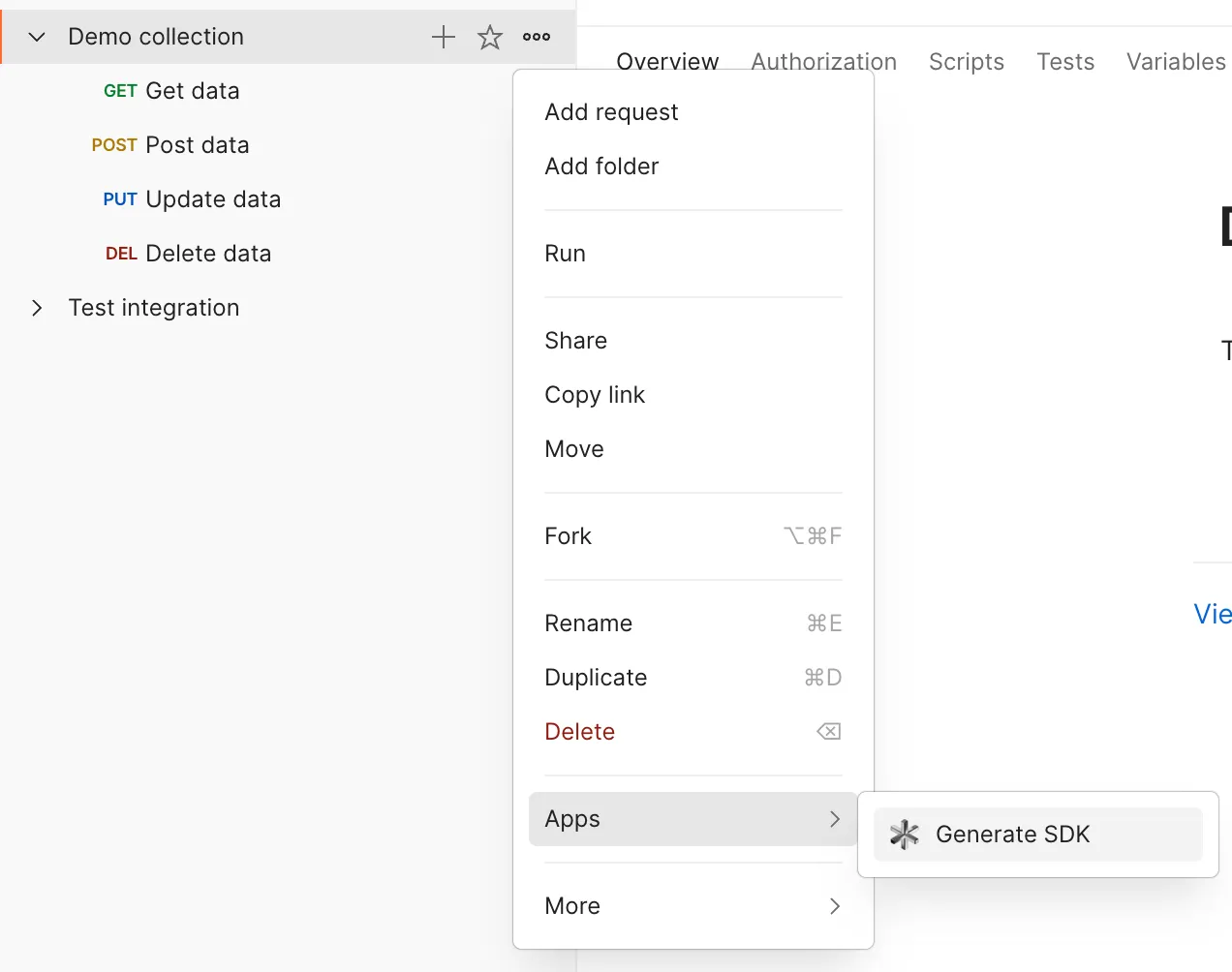
Navigate to one of your Postman collections, activate the ••• menu, select the Apps submenu, and choose the Generate SDK option:
Next, choose the programming languages you want to generate SDKs for.
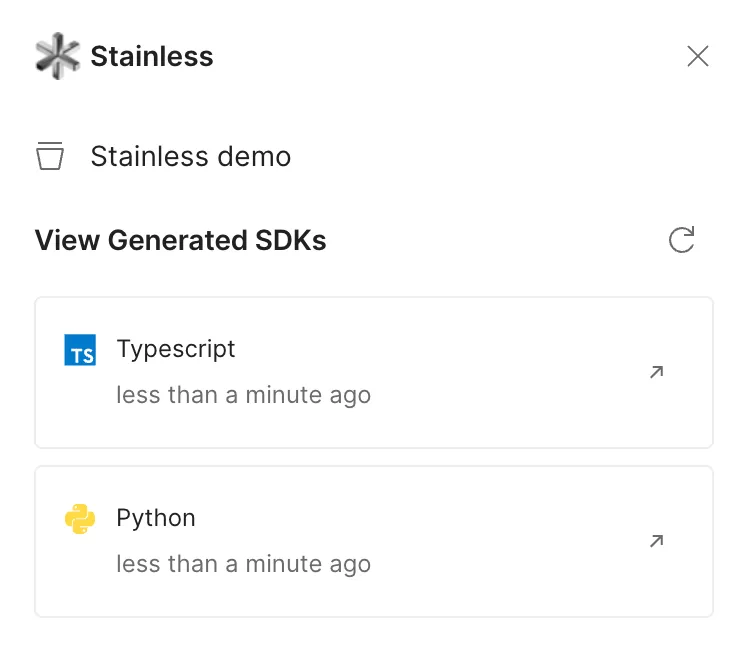
When your SDKs have been generated, a link to each one will be provided.
Generate an OpenAPI spec using the Postman API
Section titled “Generate an OpenAPI spec using the Postman API”Separate from the Stainless Postman integration, Postman also provides an API that generates an OpenAPI spec from a Postman collection, with details and examples in an associated blog post.
If the OpenAPI spec generated by Postman has issues, use transforms to resolve them.
Hand-write your spec
Section titled “Hand-write your spec”To avoid needing a third-party tool, or to have greater control over the end result, you may prefer to create the spec yourself. OpenAPI provides example specs as a good starting point and extensive reference documentation to help with common questions.