

TypeScript
Generate production-ready TypeScript SDKs from your OpenAPI specification
The Stainless TypeScript SDK generator creates idiomatic, type-safe TypeScript client libraries from your OpenAPI specification. The TypeScript target uses built-in fetch for HTTP requests, making SDKs dependency-free by default.
Example repositories:
- openai/openai-node
- anthropics/anthropic-sdk-typescript
- lithic-com/lithic-node
- Modern-Treasury/modern-treasury-node
- turbopuffer/turbopuffer-typescript
Configuration
Section titled “Configuration”To generate a TypeScript SDK, add the typescript target to your Stainless configuration file:
targets: typescript: package_name: my-company-sdk edition: typescript.2025-10-10Common configuration options
Section titled “Common configuration options”targets: typescript: package_name: my-company-sdk
# Specify the edition edition: typescript.2025-10-10
# Specify the package manager (default: pnpm) package_manager: pnpm # or: yarn, npm
# Configure publishing publish: npm: true jsr: package_name: "@my-scope/my-sdk"For a complete list of configuration options, see the TypeScript target reference.
Editions
Section titled “Editions”Editions allow Stainless to make improvements to SDKs that are not backwards-compatible. You can explicitly opt in to new editions when you are ready. See the SDK and config editions reference for more information.
typescript.2025-10-10
Section titled “typescript.2025-10-10”- Changed default package manager from yarn to pnpm
- To revert to yarn, set
options.package_manager: yarn
typescript.2025-10-08
Section titled “typescript.2025-10-08”- Initial edition for TypeScript (used by default if no edition is specified)
Supported environments
Section titled “Supported environments”TypeScript SDKs use native fetch and work across multiple JavaScript runtimes. The SDK automatically detects the runtime environment and configures itself accordingly.
Runtime support
Section titled “Runtime support”| Environment | Status | Notes |
|---|---|---|
| Node.js 18+ LTS | Full support | Recommended: Node 20+ for TypeScript projects |
| Deno 1.28+ | Full support | Uses web runtime natively |
| Bun 1.0+ | Full support | Compatible with Node.js APIs |
| Cloudflare Workers | Full support | Tested in ecosystem tests |
| Vercel Edge Runtime | Full support | Uses web-compatible APIs |
| Nitro 2.6+ | Full support | Earlier versions had exports map issues |
| Web browsers | Conditional | Chrome, Firefox, Safari, Edge (requires configuration) |
| React Native | With polyfills | Requires polyfills for streaming support |
| Jest 28+ | Node environment only | jsdom environment not supported |
Browser support configuration
Section titled “Browser support configuration”By default, most SDKs block browser usage to prevent accidental API key exposure. You can configure browser support in your Stainless config:
targets: typescript: options: browser: state: allow # or: disallow, dangerous_allow| Mode | Behavior |
|---|---|
allow | SDK works in browsers without restrictions |
disallow | Throws an error if used in a browser (default for most SDKs) |
dangerous_allow | Requires explicit dangerouslyAllowBrowser: true in client options |
TypeScript configuration
Section titled “TypeScript configuration”Ensure your tsconfig.json meets the minimum requirements:
{ "compilerOptions": { "target": "ES2015", "lib": ["ES2018"], "moduleResolution": "bundler" }}Minimum requirements:
target:ES2015or higher (required forWeakMapand private class fields)lib:ES2018or higher (required forAsyncIterable)moduleResolution:bundler(recommended for TS 5.0+) orNodeNext
Environment-specific types:
Depending on your runtime, include the appropriate type definitions:
| Runtime | Types configuration |
|---|---|
| Node.js | @types/node >= 18.18.7 |
| Bun | @types/bun >= 1.2.0 |
| Cloudflare Workers | @cloudflare/workers-types with lib: ["ES2020"] |
| Browsers | lib: ["DOM", "DOM.Iterable", "ES2018"] |
| Deno | No additional configuration needed |
Publishing to npm
Section titled “Publishing to npm”Package your TypeScript SDK for distribution on npm, making it easy for users to install with npm install.
Publish your package to npm for the first time
Before you can configure trusted publishing, npm requires that your package already exists. Follow these steps to publish your SDK manually for the first time:
-
Clone your SDK’s production repository and navigate to it.
-
Install dependencies and build the SDK:
Terminal window pnpm installpnpm build -
Navigate to the
distdirectory where the publishable package is located:Terminal window cd dist -
Log in to npm:
Terminal window npm loginThis opens a browser window to complete the npm OAuth flow. Follow the prompts to authenticate.
-
Publish the package:
Terminal window pnpm publish
After your package is published, you can proceed to configure trusted publishing.
Setup GitHub Actions as a trusted publisher
-
Navigate to your packages settings at
npmjs.com/package/<package-name>/accessand under the Trusted Publisher section choose GitHub Actions. -
Fill in the organization or user where your SDK’s repository lives and the repository’s name.
-
Put in
publish-npm.ymlas the workflow filename. -
[Recommended] If you use a specific GitHub Actions environment for releases, specify it for environment name. This restricts publishing to release workflows running in that environment.
To set the release environment, add it to your Stainless config:
codeflow:release_environment: <environment-name># ... -
Click Set up connection.
Update your Stainless config
Update the Stainless config to specify OIDC authentication and save.
targets: typescript: package_name: <package-name> publish: npm: auth_method: oidcUse access tokens to authenticate with npm. Note that granular access tokens expire after 90 days, and you need to rotate them.
Get an access token
- Log in or sign up at npm.
- Select your profile picture on the top right to open a dropdown.
- Navigate to Access Tokens > Generate New Token.
- Choose a token version:
-
Classic Token, with Automation as the token type. This token scopes to your whole account.
-
Granular Access Token, scoped to the NPM package you’re publishing. The token needs read and write permissions. If you don’t have an existing NPM package, you can make an empty one as a starting point.
-
Add the token to your production repo
- In the production repo, navigate to Secrets and variables > Actions > New repository secret.
The URL should look like
https://github.com/<org>/<repo>/settings/secrets/actions/new. - Add a new secret named
NPM_TOKENwith your API token.
Choose a package name and update your Stainless config
- Choose an available package name.
You can check if the name is available.
If you are using an existing NPM package, check the publishing access, under package settings, so that it does not require two-factor authentication.
-
Update the Stainless config with your package name and save.
targets:typescript:package_name: <package-name>publish:npm: true
Publishing to JSR (Deno)
Section titled “Publishing to JSR (Deno)”Publish your TypeScript SDK to JSR for use with Deno and other JavaScript runtimes.
Create a JSR package
- Log in or sign up at JSR.
- Select Publish a package.
- Choose an appropriate scope and package name.
- Select Create.
Link your production repo and configure security
- In JSR, navigate to <package-name> > Settings > GitHub Repository.
- Link the production repo to the JSR package you created.
- Navigate to your <scope-name> > Settings > GitHub Actions security.
- Select Do not restrict publishing. This allows the Stainless GitHub App to publish even though it is not a member of your scope.
Update your Stainless config
Update the Stainless config with your package name and save.
targets: typescript: publish: jsr: package_name: "@<scope-name>/<package-name>"Create a JSR package
- Log in or sign up at JSR.
- Select Publish a package.
- Choose an appropriate scope and package name.
- Select Create.
Get an access token
- In JSR, navigate to Account > Tokens > Personal access tokens > Create new token.
- Navigate through wizard to get your token:
- Publish packages
- A development machine
- Create a token
- Create a token for the package name.
Add the token to your production repo
- In your production repo, navigate to Secrets and variables > Actions > New repository secret.
The URL should look like
https://github.com/<org>/<repo>/settings/secrets/actions/new. - Add a new secret named
JSR_TOKENwith your API token.
Update your Stainless config
Update the Stainless config with your package name and use_access_token, and save.
targets: typescript: package_name: <package-name> publish: npm: true jsr: package_name: @<scope-name>/<package-name> use_access_token: trueReact Native
Section titled “React Native”React Native does not include all web APIs that the TypeScript SDK expects. To use a Stainless-generated TypeScript SDK in React Native, you need to install polyfills for the missing APIs.
Required polyfills
Section titled “Required polyfills”For bare React Native projects (or Expo projects that need streaming), install the following polyfills:
npm install react-native-url-polyfillThen import them at the top of your app entry point (before any SDK imports):
// App.tsx or index.js - import polyfills firstimport 'react-native-url-polyfill/auto';import { polyfillGlobal } from 'react-native/Libraries/Utilities/PolyfillFunctions';import { fetch, Headers, Request, Response } from 'react-native-fetch-api';
// Polyfill fetch with streaming supportpolyfillGlobal('fetch', () => fetch);polyfillGlobal('Headers', () => Headers);polyfillGlobal('Request', () => Request);polyfillGlobal('Response', () => Response);
// Now import your SDKimport MySDK from 'my-sdk';
Which APIs need polyfills
Section titled “Which APIs need polyfills”The TypeScript SDK requires these browser/Node.js APIs that React Native does not provide:
| API | Polyfill package |
|---|---|
URL / URLSearchParams | react-native-url-polyfill |
fetch / Headers / Request / Response | react-native-fetch-api |
crypto.getRandomValues | react-native-get-random-values |
TypeScript configuration
Section titled “TypeScript configuration”Ensure your tsconfig.json includes DOM types:
{ "compilerOptions": { "target": "ES2015", "lib": ["DOM", "DOM.Iterable", "ES2018"] }}File uploads
Section titled “File uploads”For file uploads in React Native, use the SDK’s toFile helper with a Blob or the file’s URI:
import * as FileSystem from 'expo-file-system';
// Read file as base64 and convert to Blobconst base64 = await FileSystem.readAsStringAsync(fileUri, {  encoding: FileSystem.EncodingType.Base64,});const blob = await fetch(`data:application/octet-stream;base64,${base64}`).then(r => r.blob());
// Use with the SDKconst response = await client.files.upload({  file: await toFile(blob, 'filename.pdf'),});
Migrations
Section titled “Migrations”Migrate from the Node target to TypeScript
If you currently use the node target, you can migrate to the typescript target to benefit from zero dependencies and improved developer experience. The new TypeScript SDK generator uses built-in fetch instead of node-fetch.
For more information on the changes, see the changelog entry.
Before migrating
Section titled “Before migrating”Custom code conflicts
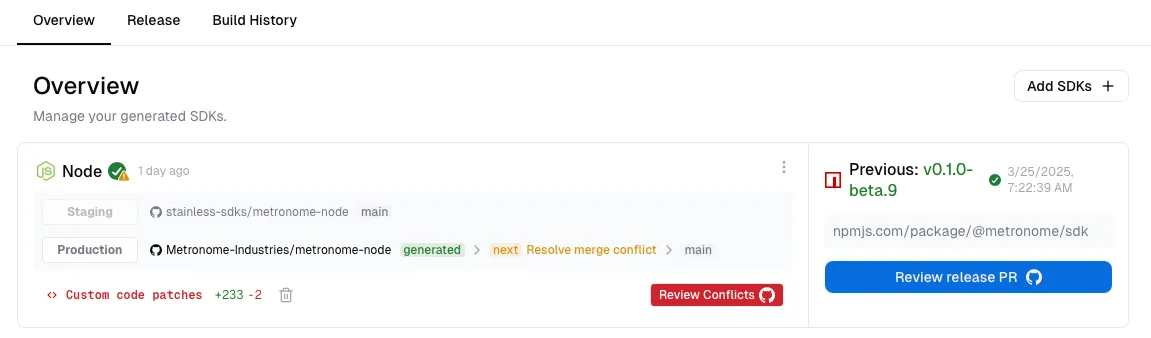
To avoid problems during the migration, make sure your Node SDK does not have any open conflict PRs.
- Go to your project’s “Overview” page.
- If you see an open conflict, resolve it first. See our custom code documentation for more details.
Production repositories
You will need to decide whether you want to reuse your Node SDK’s prod repo as-is, rename it (e.g. from my-node-sdk to my-typescript-sdk), or create a new repo (to make it easier to refer to the previous version’s source code).
- If you want to keep the same prod repo and name, no action is needed and you can continue with the migration steps.
- If you are reusing the existing prod repo but want to rename it (for example, from
my-node-sdktomy-typescript-sdk), first complete the migration steps, then rename the GitHub repo and update theproduction_repokey in your Stainless config. - If you prefer to create a new production repo, do so before migrating.
Migration steps
Section titled “Migration steps”-
Note the current version of your
nodeSDK from itspackage.json. -
Choose a new version number. This is a breaking change, so if you have released a v1 you need to bump the major version (for example, v1.x.x → v2.0.0).
-
In your Stainless config, add a new
typescripttarget:targets:node: # <-- Your existing node targetpackage_name: my-sdkproduction_repo: my-org/my-sdk-nodepublish:npm: truetypescript: # <-- The new typescript targetpackage_name: my-sdk # Same name as for nodeproduction_repo: null # Don't set the prod repo yetpublish:npm: falseoptions:node_migration: # These values will be used in the generated migration guideprevious_version: '1' # Last version number before migrationmigrated_version: '2' # New version number for the `typescript` SDK -
Save and build. Stainless creates a new staging repository named
<project_name>-typescript. -
Review the
MIGRATION.mdfile that Stainless generates in the TypeScript staging repo and verify that everything looks correct. -
Update the
typescripttarget to use the prod repo, set thepublish.npmflag totrue, and remove thenodetarget. If you prefer to keep the node target in your config, set itsproduction_repotonull.targets:typescript:package_name: my-sdkproduction_repo: my-org/my-sdk-node # Updated prod repopublish:npm: true # Enabled NPM publishingoptions:node_migration:previous_version: '1'migrated_version: '2' -
Save and build. Stainless opens a release PR with the new
typescriptSDK and migration guide. If the version is not what you expected, update the PR title to correct it.
Your SDK is now using the typescript SDK generator, with zero dependencies and an improved developer experience.
If you have questions or run into issues, email us at support@stainless.com.
Design decisions
Section titled “Design decisions”No TypeScript classes for API models
Section titled “No TypeScript classes for API models”Stainless intentionally models TypeScript SDK data structures as type-level constructs (like interfaces and discriminated unions), not runtime class hierarchies.
While classes can feel familiar if you’re coming from object-oriented SDKs, we’ve found this approach is more idiomatic and practical for modern TypeScript users:
-
Performance: Using runtime classes means walking JSON responses, constructing class instances, and checking types dynamically. Our approach avoids that overhead and lets you use
response.json()directly. -
Bundle size: Runtime class systems require shipping additional model code and supporting metadata. Type-level modeling keeps SDK output lean, which is especially important for browser bundles and edge runtimes.
-
Forward compatibility: Class-heavy designs tend to encode more assumptions at runtime. With type-level models, SDKs are more resilient to additive API changes and unknown values.
-
Exhaustiveness checking: Discriminated unions pair well with TypeScript’s control-flow analysis, making it easier to write exhaustive
switchstatements over discriminator fields. -
instanceofis brittle: In JavaScript/TypeScript,instanceofrelies on runtime prototype identity. This breaks when multiple versions/copies of a package are present in an app.
If you need runtime checks for one or more variants, we recommend adding type guards based on discriminators with custom code. For example:
type Pet = Dog | Cat | Fish;
function isMammal(value: Pet): value is Dog | Cat {  return value.type === "dog" || value.type === "cat";}
This gives you reliable runtime branching and type narrowing without requiring instanceof.
Property name case
Section titled “Property name case”Our TypeScript SDK generator preserves property names in JSON requests and responses exactly as they appear in your API. We don’t currently plan to add an option to map snake_case (user_id) in your API to camelCase (userId) in the SDK.
While mixing camelCase and snake_case can feel awkward initially, we’ve found the benefits of preserving exact API names outweigh the negative gut reaction:
-
Bundle sizes matter: It’s critical to keep bundle sizes low for frontend bundles and edge functions. Converting property names would require shipping additional transformation code and metadata, significantly increasing SDK size.
-
Undocumented properties: APIs often include experimental or undocumented properties not in the OpenAPI specification. Without knowing these properties exist, we can’t reliably transform their names. For example, if your API returns an undocumented
experimental_featurefield, there’s no way to know it should map toexperimentalFeature. -
Developer expectations: Developers’ mental models of request/response properties naturally map to the JSON sent over the wire. Unlike languages like Go where explicit serialization is expected, TypeScript developers often find it confusing when the SDK doesn’t match the API documentation. In practice, we rarely hear complaints from end users once they’re using the SDK.